Lazy line buffers
12 minute read •
Twenty years. Yes, I realise there has been a bit of a gap since the last instalment. This is what happens when Windows becomes so unbearable that you lose all interest in the platform. But we’re going to talk about lazy line buffers, rather than the nagging sensation that a completer-finisher’s work is never done…
The previous tutorials introduced Neatpad’s piece-chain design: that the document is a sequence of spans referring either to the original file or to text added by the user. That solved the problem of editing without repeatedly moving the whole document in memory. But it also left us with a question: how do we find lines in a sequence whose contents are split across many spans?
Line buffers are inadequate
Text editors are inherently line-based. The view is drawn one line at a time. Scrolling is line-based. Mouse & keyboard navigation are line-based. The entire coordinate system is line-based! Given any position in the document, we always need to find the start and end position of the containing line. Given a line position, we need to find the corresponding bytes. Editing, painting, mouse hit-testing and keyboard navigation all rely on these operations. Unicode adds in an additional dimension of complexity.
The early Neatpad implementation used a conventional line buffer: a simple array of offsets, one for each line’s offset in the file. This works well when the document is loaded into memory and its line structure is known. But I knew at the time this would be lacking; it was just a necessary first step in getting the text editor to come together.
The introduction of the piece-chain was deliberate - we needed to support large (even huge) files and it is a very effective design, at least for a hex editor. But the piece chain also creates a problem for us. Lines can cross span boundaries, and inserting or deleting a line will change the line structure even though much of the underlying text is unchanged. Inserting even a single character requires that the entire line-buffer is recalculated.
Lines vs Spans
To solve this problem, we need a major change in the line-buffer architecture. The logical line-index will no longer sit outside of the piece-chain (figure 1).
In the revised design, the line index belongs to the sequence and represents physical line positions in the underlying file where line-breaks occur. In addition, every span carries a count of the line breaks in the range of data the span represents.
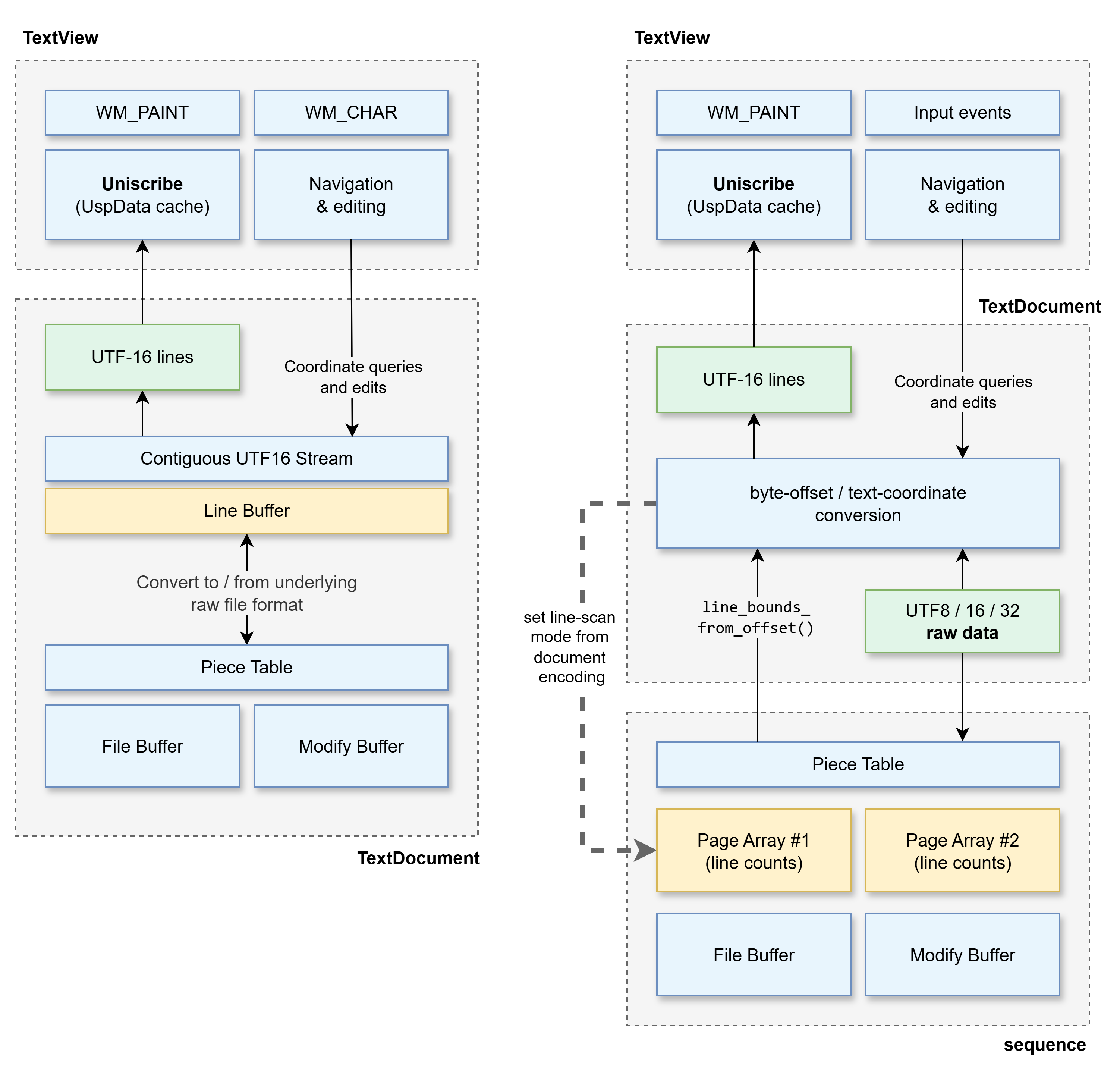 Figure 1 — logical line index (deprecated)
Figure 2 — page-based line index
To illustrate how the sequence-based line-buffer works, let’s consider a file containing the Latin alphabet (a-z) with a few line-breaks thrown in for good measure (Figure 3). Let’s also insert a couple of lines of text to manipulate the sequence (Figure 4):
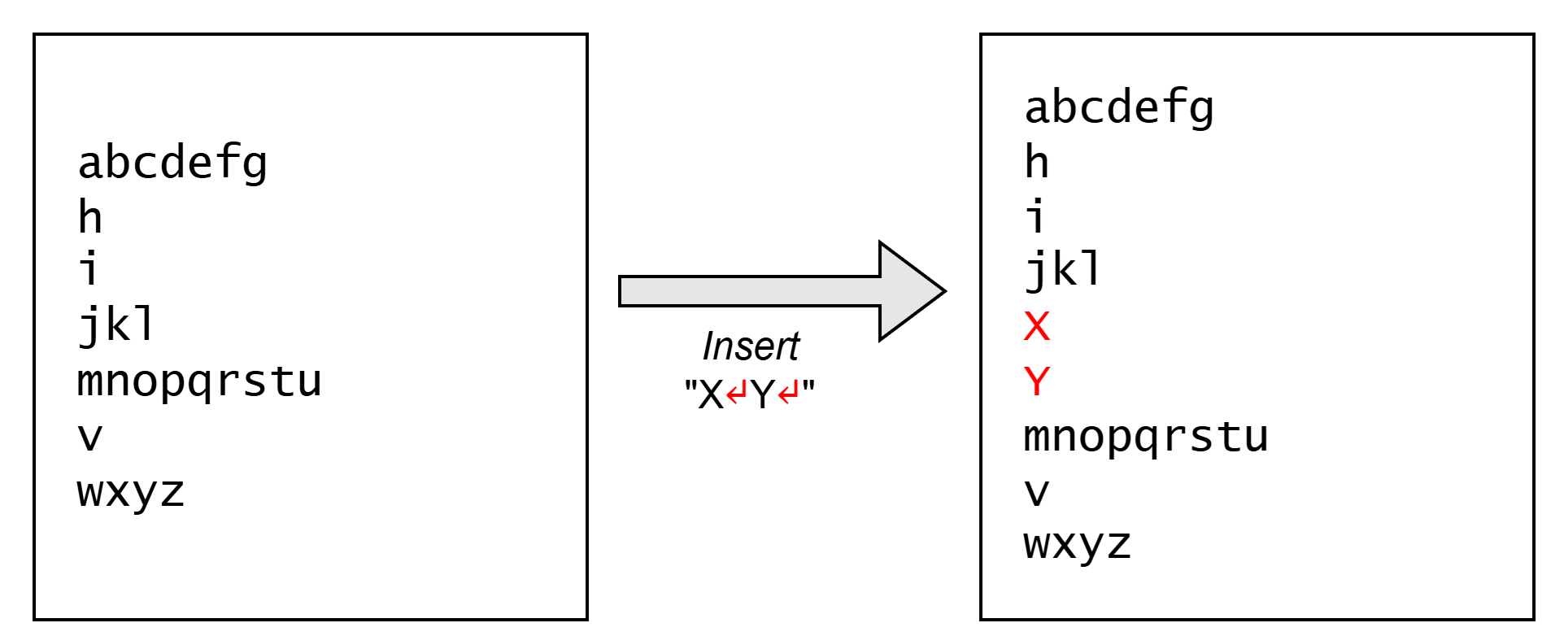 Figure 3 — example text
Figure 4 — with inserted text
After the text “X↵Y↵” has been inserted, the piece-chain / span sequence will look like this:

Span table after insertions
Line-breaks (newline characters) are shown in red. You can hopefully see that there are three spans after the initial edit - with two spans referencing portions of the original file buffer, and the middle span referencing text from the modify buffer. You may need to refresh your memory on the original piece-chain design before reading this next section.
Line index for span tables
The elegance of the piece-chain facilitates O(C) editing no matter what size of file is represented. The spans provide the layer of indirection to support this, but as a result spans do not know their logical position in the file. Indexing a sequence means we must traverse the span table, counting span lengths, until we find the span that represents the data range we are interested in.
We’re going to use the exact same concept for tracking lines. Every span must now keep an additional variable (line_count) that counts how many line-breaks the span contains. To find a particular line of text in the sequence, all we need to do it walk the spans, adding up the accumulating line-breaks until we find a span that falls onto the line we are interested in.

Span table with line counts
Let’s follow an example. We’re looking for line 8. By adding the line-breaks of the first two spans (4 + 2 → 6), we know that line 8 must fall within the last span because 8 is within the range that the span represents (lines 7-9).
Indexing the line-buffer involves walking the spans in the table, and at the same time keeping a count of the lines until the right span is identified that contains the desired line.
Paging for large files
So what happens when we have found the right span, but we need to zero in on the exact byte position we need? The span counts only tell us which span contains the line break we want, but not where that break sits within the span.
So in addition to keeping track of line-break counts in each span, we also need to maintain a ‘page-based’ array that tracks line-breaks in the underlying file. We divide each buffer into fixed-size pages and keep an array recording how many line breaks occur in each page. These entries are counts; they do not store the position of every line.
Once we know the span, its buffer and byte offset tell us where to start looking in that buffer’s page array. Counts for complete pages let us skip over their bytes. When we reach the page containing the break, we scan its bytes to find the exact position. The original file and modify buffer have separate page arrays, so rearranging spans does not invalidate counts for pages already scanned.
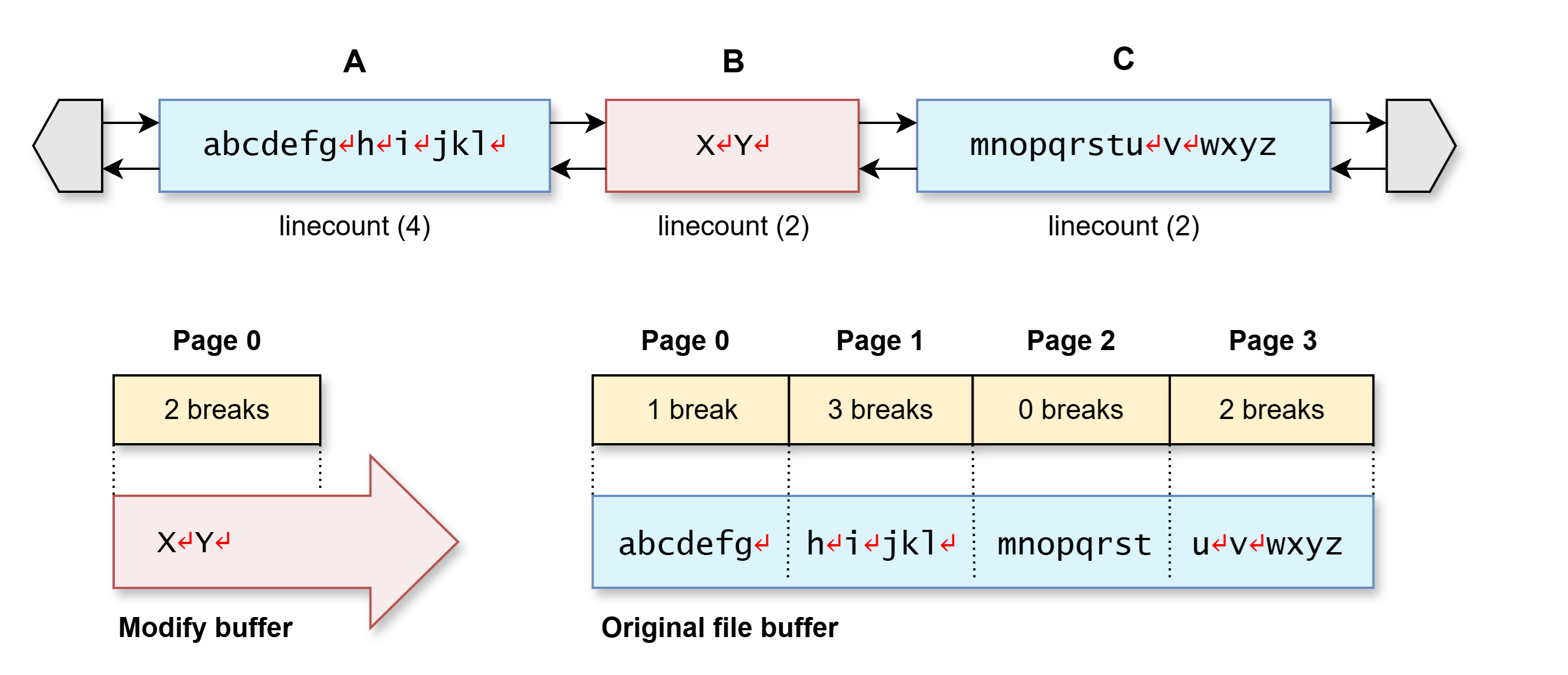
Line paging for span table
Let’s examine how this works in practice. The diagram above shows how we maintain a line-page array for each backing buffer. The modify buffer has one array, and the original file has a separate array. For this example the page size is really small (8 bytes); the actual implementation uses 64kb pages.
Let’s take our example again. As we’re looking for line 8, we need to find the seventh linebreak in the sequence; the byte following this is the start of line 8. This is how we calculate the line’s offset:
- Span search — find the span containing the seventh break.
Iterate spans and sum the whole-span counts:- A(
4) + B(2) → 6 breaks
→ keep going - Span C has 2 breaks
→ the seventh break must be somewhere within this span (6 < 7 ≤ 6+2)
- A(
- Page search — find the page containing that break
Span (C) points to the original file buffer, bytes 16-31.
Calculate the page that span C starts at (8-byte pages):
→ Byte 16 is in page 2 (16 ÷ 8 → 2)
Iterate the page array from position 2:- Page 2 (
bytes 16-23: mnopqrst) contains 0 breaks
→ we’re still at line 7; keep going - Page 3 (
bytes 24-31: u↵v↵wxyz) contains 2 breaks
→ seventh break is here somewhere
- Page 2 (
- Byte search — find the exact break within the page.
Scan forwards from byte 24 (u) to the first\n- The first break is at byte 25
- The following byte (
v) is at physical offset 26 (in the original file) and logical offset 30
→ we’ve found the start of line 8.
The search can be summarised as a three-phase sequence: Spans → Pages → Bytes.
Each layer is iterated until we zero-in on the exact position we need. Using the span table to track line counts is an elegant solution that allows us to maintain a static line buffer for the original backing file, and a separate line buffer for the modified bytes. We can edit and rearrange the spans at will, without having to rebuild the line-break arrays.
Phew! That might seem like a lot of work just to find a line. So we need to understand why this is a good solution.
Can’t we optimize this?
It is optimized! For gigantic files this is the optimal solution. We’ve optimized the algorithm for the general case, rather than pure speed over a small file.
But we’ve actually optimized the line buffer in two aspects:
- For speed; it’s actually quite fast to zero-in on the page we want. Once we have the span, its trivial to locate where to start searching in the line-buffer. Divide the physical offset by the page-size to calculate the page number. Then simply iterate up to a page-size’s worth of text to zero-in on the exact line.
- Memory usage is also optimized. Consider a multi-gigabyte file. If we maintained a granular line buffer (one entry per line) the line-buffer itself could be hundreds of megabytes, if not gigabyte-sized. That does not work for a ’neat’ text editor. If we store line-breaks per 64kb page, the line buffer will be dramatically smaller. Just a few megabytes.
The entire operation to locate a line does not depend on the size of the file (once the page-array has been built). That’s important to stress. And memory usage is rather modest. Whilst its not quite O(C) / constant time, searching within a page is never more than 64kb to process. Line-indexing is not a function of the overall file-size. It’s really quite fast (blazingly fast), as you’ll see from using Neatpad now.
There’s always a catch
It’s not quite as simple as it might look. Counting a line break is a more subtle than searching for a newline byte. There are several edge-cases that we must cater for:
- CR+LF combinations must count as one line break, not two.
- CR+LF split across spans. If one span or page ends with CR and the next begins with LF, those two bytes form one line break, not two.
- CR+LF split across pages.
Neatpad supports CR, LF and CRLF. The sequence therefore records whether a range starts with LF or ends with CR, and corrects the count when adjacent ranges are joined.
The counts also record which line-ending forms have been seen. This lets the document identify mixed line endings without changing the sequence’s basic byte-based representation. This is a subtle detail that is too tedious to walk through; suffice to say the implementation (and the many, many related unit tests) are the place to look.
What does a page look like?
The previous diagram shows page-tables with the completed page counts for our example. I kept the diagram deliberately simple, but one detail I omitted is that the line-page arrays are computed lazily.
Neatpad does not need or want to calculate every one of those counts when it opens a file. That would be really slow for large files. Therefore each backing buffer has a page-array with one entry per page, but the entries are only filled as the pages are scanned. Our example uses eight-byte pages so that we can see what is happening; Neatpad itself uses 64 KB pages.
struct line_page
{
  size_w       breaks         = 0;    // break count
  size_w       chars          = 0;    // UTF16 unit count
  size_w       scanned_length = 0;	  // bytes counted in this page
  bool	       starts_with_lf = false;
  bool	       ends_with_cr   = false;
  break_kinds  kinds;				  // fits in existing padding
};
Each line_page entry contains a line-break count and a UTF-16-unit count. It also records scanned_length: how many bytes of that page were counted. This is how we distinguish a page containing no line breaks from a page whose contents we do not yet know. There is no separate “known” flag on a page.
| Page | Breaks | Scanned length | Meaning |
|---|---|---|---|
Page 2 (mnopqrst) | 0 | 8 | Scanned; there are no breaks |
Page 3 (u↵v↵wxyz) | 0 | 0 | Not scanned yet |
| Page 3, after scanning | 2 | 8 | Scanned; there are two breaks |
A page is current when its scanned length matches its actual length, which may be less than eight bytes for the final page. The entry also keeps a little information about line endings at its boundaries, so that a CR at the end of one range and an LF at the start of the next count as one break.
These page counts belong to the underlying buffer, not to the logical document. Rearranging spans does not change the bytes already scanned in the original file, so those counts remain valid after edits, and through undo and redo. A modify buffer can grow, however, so its final page is re-scanned when more bytes are appended.
Spans have their own aggregate line-break counts. Unlike a page, a span has an explicit line_count_known flag: it cannot claim an exact count while its range includes unscanned file pages. In the “line 8” example, we used the counts shown in the completed diagram. If page 3 had not yet been scanned, Neatpad would need to index it before using its count to identify the seventh break.
Editing the index
The span counts describe the bytes in each span, so an edit does not require rebuilding an array of every line start. When an insertion, deletion or replacement changes the sequence, the affected spans are split, joined or replaced. Their line metadata is refreshed, and the sequence invalidates its cached totals and exact-prefix information.
This also explains how line information tracks undo and redo events. The history stores the span ranges needed to restore earlier sequence states. Undoing or redoing swaps those ranges back into the sequence and updates the affected byte ranges. The line metadata is then recalculated from the spans that are now present. The index therefore describes the current text, rather than maintaining a separate history of line numbers.
File-backed buffers also keep counts for pages that have been scanned. These counts let the sequence skip over known regions instead of walking every byte whenever it needs to answer a line query.
How far have we counted?
For a small in-memory document, the sequence can count all its lines. A large file is different. Neatpad initially counts only the first portion of the file, and extends that range as more of the document is needed. Line numbers within the calculated region are exact (as in, known). Beyond this region, a line can still be found by scanning locally around a byte offset, but its global line number is not necessarily known.
This distinction separates two jobs that the original line buffer combined. Finding the line near a byte position is a local operation. Knowing the exact global number of that line requires counting all the line breaks before it.
A sparse table of every thousandth line might use less memory than a complete line buffer, but building it still requires scanning the whole file. That is the issue that becomes unavoidable when documents grow to several gigabytes.
The next question
The piece-chain lets Neatpad edit large documents without copying the entire file. The sequence line index lets it find and count lines without storing every line start. But if only part of the file has been counted, what should the scrollbar, caret and view use as their coordinates?
That is the subject of the next tutorial. The key is to stop treating an exact global line number as the position of the text.