Byte-based coordinates
11 minute read •
The previous tutorial posed the question: if a large file has only been partly indexed, what coordinates should the editor use for its view and caret? How can we index using line numbers when we don’t know where the lines are yet?
Prior to this, I believed the hardest problem was going to be maintaining a line buffer that understood both UTF-8 and UTF-16. But there is a more fundamental problem than this. We cannot build a line-buffer for a gigabyte-sized text file because the entire file must be parsed - an exact line number depends on knowing how many line breaks came before it. A complete or even sparse line-index still requires reading the entire file to discover those breaks.
For a multi-gigabyte file, this makes global line numbering a poor foundation for the editor. We cannot rely on global line-numbers as the main coordinate system for our editor. We need to fundamentally change our approach to line indexing.
Changing course
Up until this point, Neatpad used an ’exact’ line-based coordinate system:
m_nCurrentLine- the line containing the caretm_nVScrollPos- the line at the top of the view portm_nVScrollMax- the total number of lines in the file.
These values are used throughout the code, from scrolling to viewport rendering, mouse hit-testing and cursor navigation. They’re everywhere.
All of these values assume that we know how many lines there are, and where they are located. The scrollbars and scrolling range in particular is setup based on the exact number of lines in the file. But how do we know how many lines there are without parsing the entire file first?
We cannot contemplate a long delay when first opening a file. Text files must load & render instantly; this was always the goal for Neatpad. So what approach do we take?
We can answer this question by asking a slightly different one: why do we need to know what line number we’re on? Why do we need to know how many lines there are? The reason is mostly cosmetic - we need line numbers so display in the editor margin, and to display the current line in the status bar.
Random access through the scrollbar
Consider a scenario where we drag the scrollbar thumb to a random position inside a gigantic 4GB file:
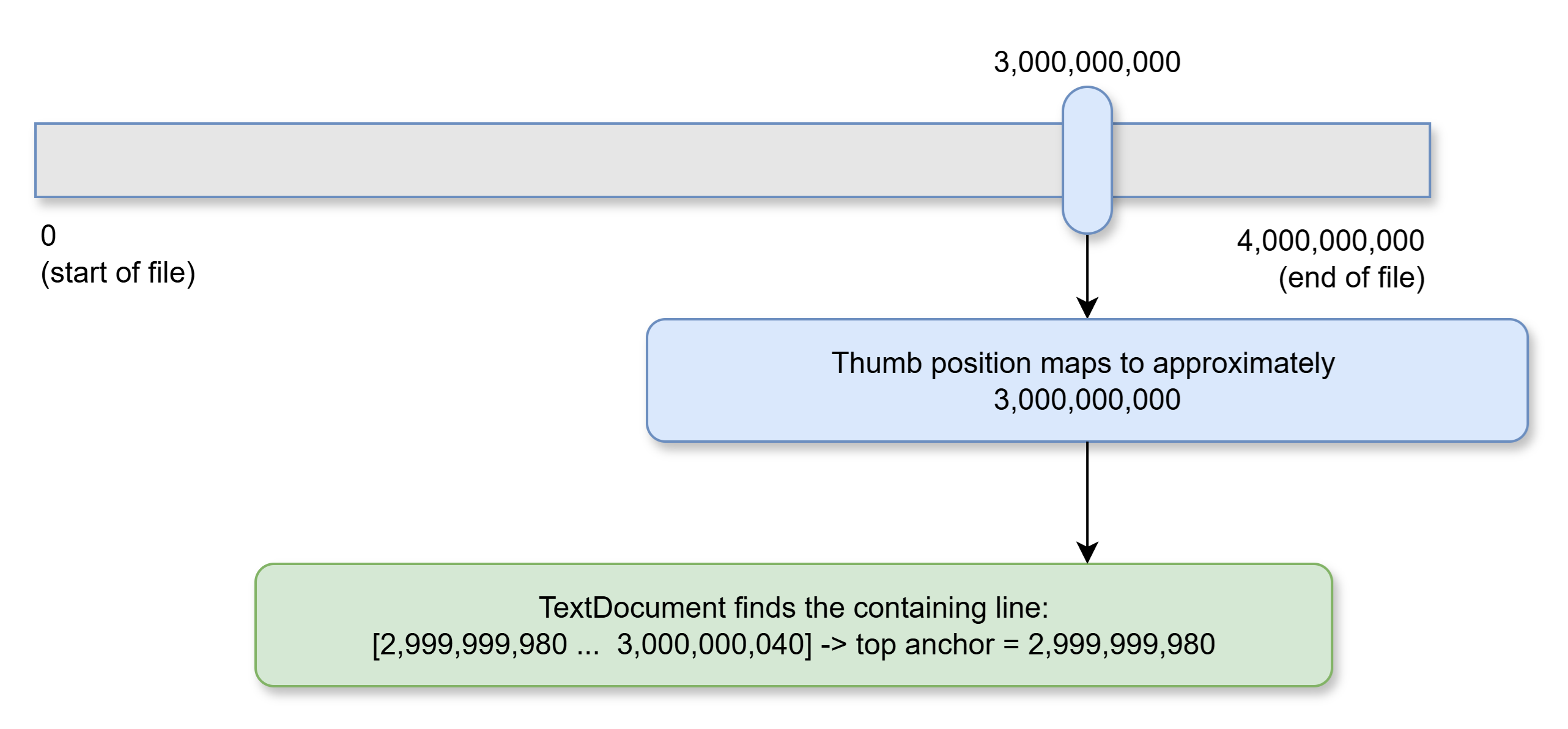
The thumb approximates a byte offset, then the document finds the containing line.
How do we know which line to display? In short, we can’t - so we guess. Neatpad maps the vertical scrollbar to byte offsets. A thumb position selects an approximate location in the sequence; the TextDocument finds the line containing that byte position and makes it the top line. For very large files, the 64-bit byte range is scaled to the range supported by the Windows scrollbar.
Line-by-line scrolling is therefore local (relative to the current position), but dragging the scrollbar thumb is random access. The scrollbar cannot walk from the current line to the target if that target may be billions of bytes away.
The estimate is not a promise that the target is a particular line. It is a way to get near the requested part of the file without first reading all of it. As more pages are indexed, Neatpad learns more about line density and can improve line-number estimates. But scrolling does not depend on those estimates being exact.
TextPos and TextCoord
The text sequence stores bytes, whether they come from the original file or from edited spans. Neatpad now identifies a position in that sequence with a TextPos: a byte offset in the edited document. This does not require knowing how many lines or characters precede it.
The view needs more information. To draw a line or place the caret, it needs to know which line contains a position and where the position falls within that line. TextDocument supplies this as a TextCoord. Its essential fields are:
struct TextPos {
    size_w byte_offset;
};

struct TextCoord : TextPos {
    TextPos line_begin;
    TextPos line_next;
    size_w  column;
};
A TextCoord retains the byte offset from TextPos. It adds the beginning of the containing line, the position immediately after that line, and a column measured in UTF-16 units from the line’s beginning. The range [line_begin, line_next] includes the line break, if there is one. There is no global line number in the structure.
TextDocument::coord_from_pos turns a position into a coordinate by finding its line bounds and calculating its column. These are facts about the local line. They can be known even when Neatpad has not counted all the lines before it. A coordinate must be refreshed after an edit, because the edit may move its byte position or change its line bounds.
Byte anchors
We can now return to the scrollbar example. Its thumb selects approximately byte 3,000,000,000. TextDocument finds that this byte lies in the line beginning at 2,999,999,980 and ending at 3,000,000,040. TextView uses the beginning of that line as the anchor for the top of the viewport.
The top-line TextCoord has byte_offset and line_begin both set to 2,999,999,980, line_next set to 3,000,000,040, and column set to zero. All of those values describe a real line at a real byte position. The line’s number in the document may still be unknown.
This distinction is the point of the anchor. The scrollbar only has to get us near the requested part of the file. Once TextDocument finds a line there, the view has an exact place from which to work.
Navigating from an anchor
Starting at the anchored line, TextView paints the first visible row. It then moves to the line beginning at line_next and paints the following row. It repeats this for the rest of the viewport. Scrolling down advances the anchor to the next line; scrolling up finds the preceding line.
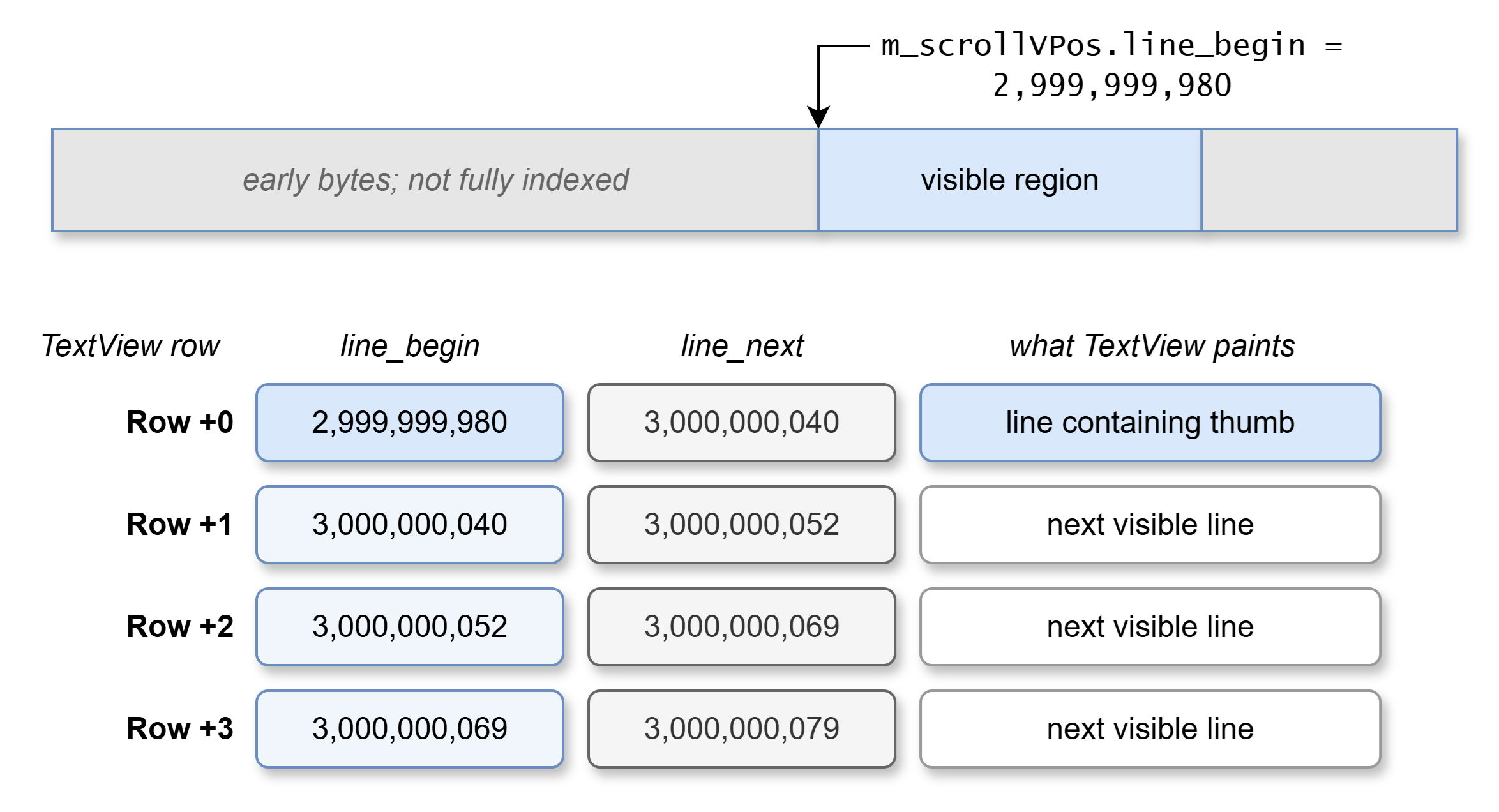
Viewport byte anchors
Painting and hit-testing work from these visible lines and their local coordinates. They do not need to turn each row into an exact document-wide line number first. Even if the viewport is three billion bytes into the file, moving down one line is still a local operation.
The anchor also helps the view retain its place through edits. An insertion above the viewport may shift its byte position, while an inserted or removed line break may change its line bounds. TextDocument adjusts the position around the edit and resolves its containing line again. The view can return to that text without maintaining a global line-number coordinate for it.
Why estimates are enough
An exact line number is useful for commands such as “go to line 500,000” and for displaying a line number in the margin. It is not required to draw the current viewport, move the caret locally, extend a selection, or jump approximately with the scrollbar.
Neatpad knows exact line numbers in the part of the document it has indexed from the beginning. Beyond that, it can estimate a line number from the line breaks found so far. Such an estimate may be wrong where the file’s line density changes, but the byte position and the line found around it are still real. The scrollbar can land on that line, and the view can navigate from there.
This is why abandoning the complete line buffer opened the way forward. It removed the assumption that every operation needs an exact global line number. Byte positions provide a reference for editing and navigation; local line information can be calculated around the viewport; document-wide line numbers can be requested when a feature needs them.
Bytes and character positions
So far, our viewport anchor has been at the beginning of a line, where its TextCoord column is zero. A caret can also sit inside a line. This is where the difference between byte_offset and column matters.
Suppose a UTF-8 line contains A, U+1F600 (😀), and B, with no line break. The three characters occupy one, four, and one byte respectively. A caret immediately before B is therefore at byte offset 5. But A occupies one UTF-16 unit and U+1F600 occupies two, so the caret’s UTF-16 column is 3. For this short line, its TextCoord has byte_offset = 5, line_begin = 0, line_next = 6, and column = 3.
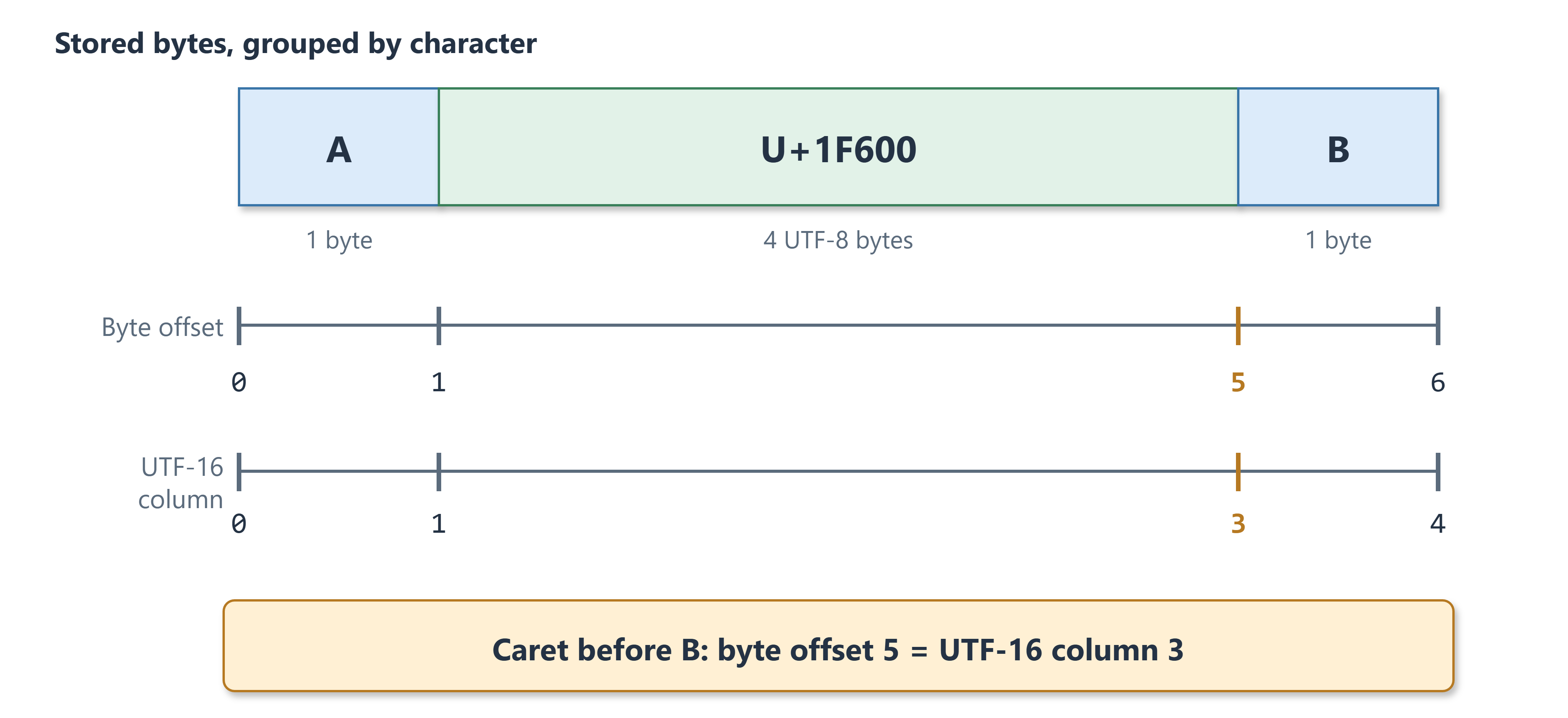
A UTF-8 line containing A, U+1F600 (a supplementary character), and B.
That column is local to the line. A document-wide UTF-16 offset is a different question: it asks how many UTF-16 units precede the position in the entire document. The sequence keeps UTF-16-unit counts alongside its span and page metadata as bytes are indexed. These counts support conversion between document byte offsets and document-wide character offsets without decoding the whole file for every query. For a large file, that answer may remain pending beyond the part indexed from the beginning.
Neatpad therefore uses several related coordinates:
- A byte offset identifies a position in the edited document.
- Line bounds describe the line containing that position.
- A UTF-16 column locates the position within that line for the view.
- A document-wide line number or UTF-16 offset is a separate query that may depend on further indexing.
This lets TextView work with exact positions and exact local lines while accepting estimates for document-wide facts that scrolling does not need.
Architecture Recap
Let’s review the final architecture of Neatpad’s TextView component:
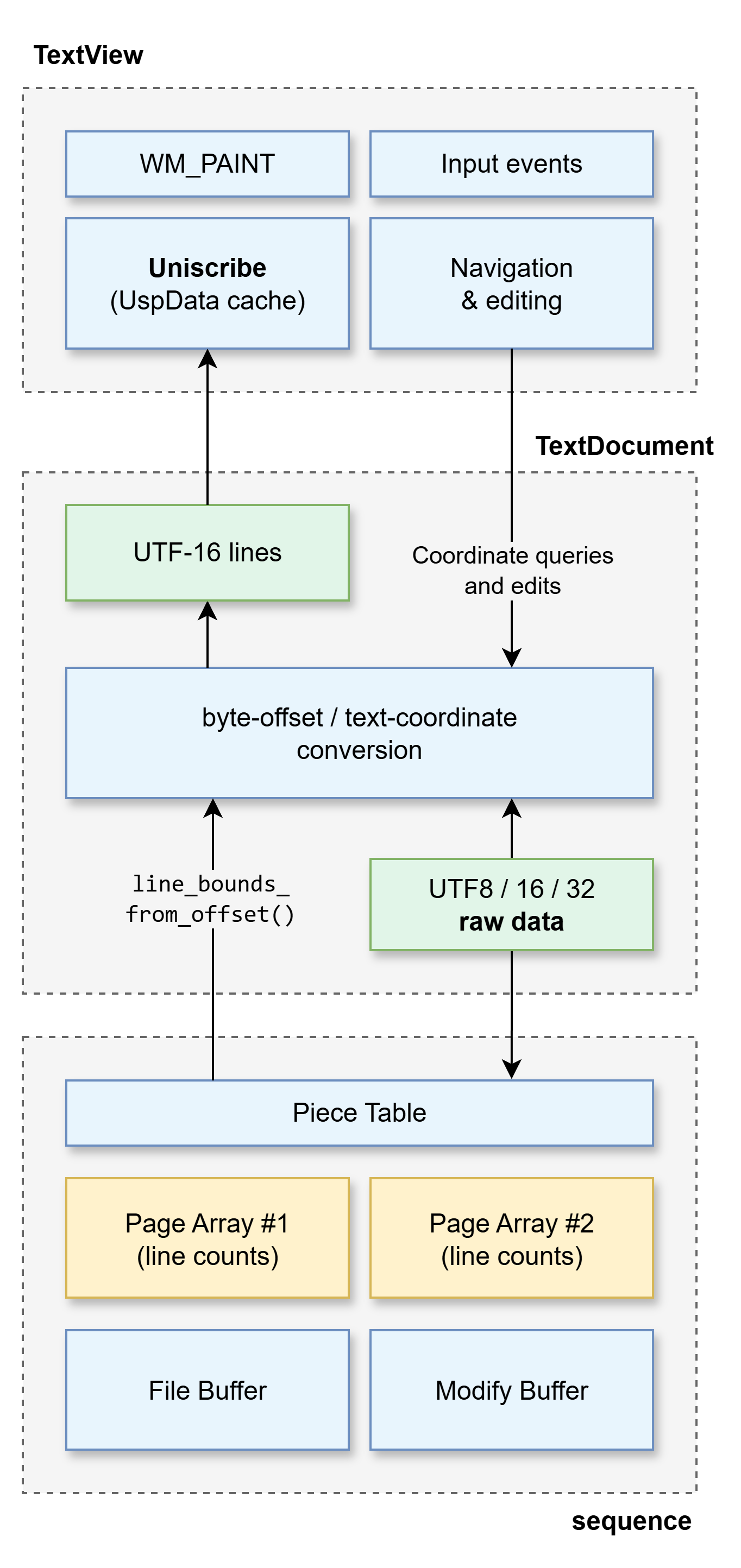
TextView architecture
TextView itself is a Win32/C custom control that can be embedded in any Windows C or C++ project. The architecture of this component is described as:
TextView
- Handles painting, scrolling, navigation, selection and editing. Its viewport, caret and selection positions are
TextCoordvalues: byte positions with exact local line information. - Works with UTF-16 text for layout and input. The Uniscribe
UspDatacache holds layout information for lines the view is using, rather than a copy of the whole document.
TextView ↔ TextDocument
- Coordinate queries and edits pass through
TextDocument. The view asks for the line around a position or for an adjacent line; it does not need that line’s global number. - Text flows back to the view as decoded UTF-16 lines. Edited UTF-16 text travels the other way and is encoded by
TextDocument.
TextDocument
- Knows the file encoding and translates between document byte positions, local
TextCoordvalues and UTF-16 text. - Finds exact local line bounds. Global line numbers and document-wide character offsets are separate queries, which may require more indexing.
- The diagram’s “UTF8 / 16 / 32 raw data” box marks this encoding boundary. The bytes themselves are stored in the sequence’s backing buffers.
TextDocument ↔ sequence
TextDocumentsends byte offsets and byte-based edits to the sequence, and selects the line-scan mode appropriate to the file encoding.- The sequence answers line-bound and index queries using spans, page counts and nearby bytes. It does not supply a document-wide UTF-16 text buffer.
Sequence and piece table
- The span table is the logical edited document. Each span refers to a byte range in either the original file buffer or the modify buffer.
- Spans carry aggregate line-break and UTF-16-unit counts for ranges that have been indexed. Editing, undo and redo rearrange spans while retaining usable counts for unchanged backing bytes.
Page arrays and backing buffers
- Each backing buffer owns its own page array. A page entry records line-breaks, UTF-16 units and how many bytes have been scanned; it does not store every line start.
- Original file pages can be counted on demand. The modify buffer holds newly added bytes, and its page information is updated as it grows.
- To locate a line, the sequence narrows the search through spans → pages → bytes.
Neatpad in action
And here it is! Neatpad in all it’s glory:
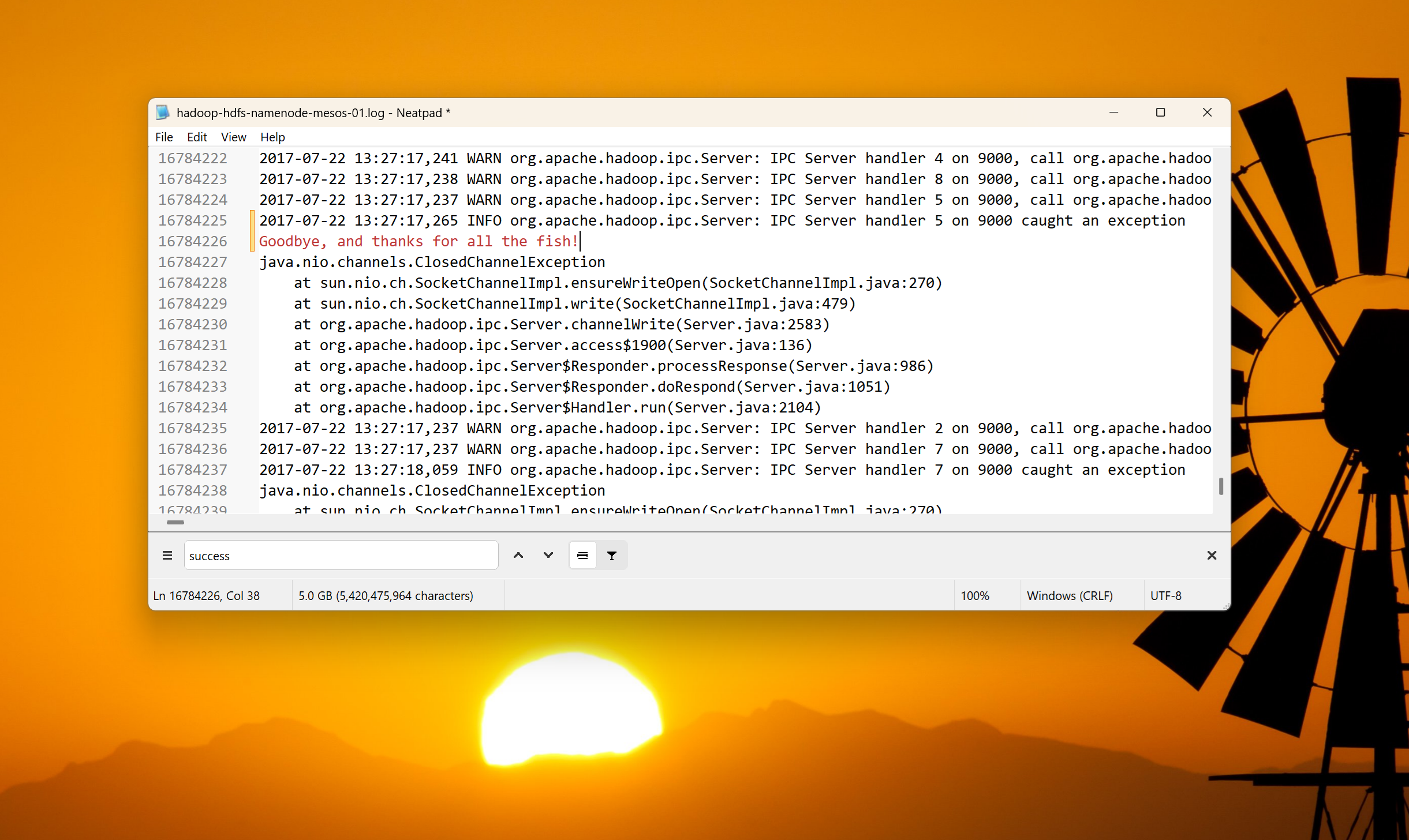
It’s been a long time coming, but its finally complete. A minimalist but highly capable, multi-encoding, multi-gigabyte text & log file editor!
The End (for now)
This is likely the last instalment in the Neatpad tutorial series. But Neatpad will live on; it is actually a very capable editor now, albeit with basic functionality.
So what have we covered? Scrolling, keyboard navigation. Unicode and Uniscribe. Piece-chains that allow Neatpad to open and edit huge files without copying the whole document. We’ve come a long way, but the story wasn’t complete without finalising the lazy line index and byte-coordinate system. We can finally load, search and edit multi-gigabyte text files with very modest memory and CPU requirements. Give it a whirl - it’s really fast!
For those of you that recently found this tutorial series - I hope you found it interesting! And for those that started reading 20 years ago and hoped for some kind of closure… well, I did promise that I’d finish this someday! Hopefully it met your expectations!?
Is there still a place for this project in the world of VSCode, Neovim and modern IDEs? Perhaps. One thing that I haven’t mentioned, is that a large portion of the codebase is cross-platform. Look out for Neatpad on Gnome someday soon!
Cheerio!
 part-20.zip