Integrating Sonos with Loxone
Introduction
I’ve recently had a Loxone home automation installed. And rather than go with Loxone’s own music system, I wanted to use my existing Sonos setup. I’ve got a lot of Sonos speakers
< diagram of setup ?>
My system comprises
User interface
Throughout the house I have regular retractive switches that operate my lighting. But in specific rooms where I also wanted to controlI had Loxone swe
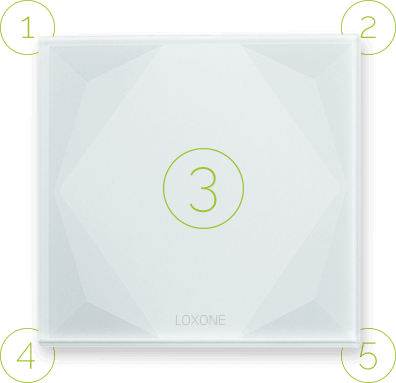
The Loxone switch standard is to use buttons 2 & 5 (top right & bottom right) as music control. When the switch is linked with a Loxone music system, the buttons operate as follows:
Single click
- Music on / volume up
- Music on / volume down
Multi click
- Change source
- Music off
I am going to closely follow this scheme. The beauty is in the simplicity - just two ‘buttons’ can turn my music on & off, and also control the volume up & down
Controlling
Loxone already has some support for Sonos, although it is quite basic and doesn’tddd
Retrieving playback state (deprecated)
One of the challenges with Loxone integration is making use of the fairly limited network commands that you can use to ‘program’.
My first attempt to retrieve the playback state from Sonos was to use the Loxone [HTTP Input|https://www.loxone.com/enen/kb/virtual-http-input/]. A HTTP input in Loxone allows you to issue simple HTTP GET requests to a device on your network, and to retrieve the response. The HTTP input allows us to parse the response and extract values that we can use as subsequent parts of the logic. It’s not quite at the level of a RegEx but it’s good enough.
http://192.168.1.54:1400/status/perf
The response from this command looks like:
currently: PAUSED_PLAYBACK x-rincon-queue:RINCON_xxxxxxxxxxx
The playback state can be one of three values:
- PAUSED_PLAYBACK
- STOPPED_PLAYING
- PLAYING
Loxone doesn’t provide any support for handling string values such as these. Loxone only provides support for digital (on & off) and analogue (0.0 -> 999999.99+) values. The HTTP input’s command recognition feature is also quite limited and only allows us to extract numeric values. So we need to
The Command recognition field for the HTTP input can set to:
currently:\s2\1
This expression searches for the text currently:, skips two characters, and returns the Ascii value of the next character. This gives the second character value of the playback state, which results in either ‘A’ (for paused), ‘T’ (for stopped) and ‘L’ for playing. The resulting values are 1,2,3
Unfortunately Sonos deprecated this method of retrieving the playback state. It is now only possible to use the official Sonos API which is a SOAP (XML) based protocol.
Retrieving playback state with SOAP
Loxone does support sending SOAP commands to a Sonos speaker and there are several examples of how to do this with a HTTP Output command. Unfortunately whilst we can send a command using this method, there is no way for us to parse the response and extract the playback state!
Integration with RaspBerry PI
from pprint import pprint
import soco
from queue import Empty

import socket

LOXONE_ADDR = "192.168.1.54"
LOXONE_PORT = 3434

def send_status(zone, name, value):
  msg = "%s:%s:%s" % (zone,name,value)

  print(msg)
  s = socket.socket(socket.AF_INET, socket.SOCK_DGRAM)
  s.sendto(bytes(msg, "utf-8"), (LOXONE_ADDR, LOXONE_PORT))

zone = soco.discovery.by_name("Kitchen")
print(zone.player_name)


from soco.events import event_listener

sub = zone.avTransport.subscribe()

# print out the events as they arise
while True:
    try:
        event = sub.events.get(timeout=0.5)
        #print(event)
        #print(event.sid)
        #print(event.seq)
        pprint(vars(event))

        print(event.variables['transport_state'])#transport_state
        send_status(zone.player_name, 'transport_state', event.variables['transport_state'])

    except Empty:
        pass
    except KeyboardInterrupt:
        sub.unsubscribe()
        event_listener.stop()
        break
When
Kitchen:transport_state:playing
Bedroom:transport_state:stopped
Setting up the RaspBerry PI
pip install soco
pip install requests
Unfortunately the
git install git+....
ssh pi@loxpi
sudo systemctl stop loxson.service
sudo systemctl start loxson.service