This project has been on the back burner for such a long time now. The 15-year-old Miele KM6839 induction hob that is. It’s always been my intention to reverse engineer this thing so that I can finally integrate it into my Loxone system.
So here’s the scenario. In theory our Miele hob can connect to a compatible Miele ventilation hood using the Miele Con@ctivity 2.0 Zigbee protocol. The hob would automate the hood whenever the hob is in use. i.e. by turning it on & off, or setting the fan level based on how much power the hob is using, etc. This all sounds nice, but I don’t have a Miele extractor fan, so integrating this hob into my HA setup is not going to be easy.
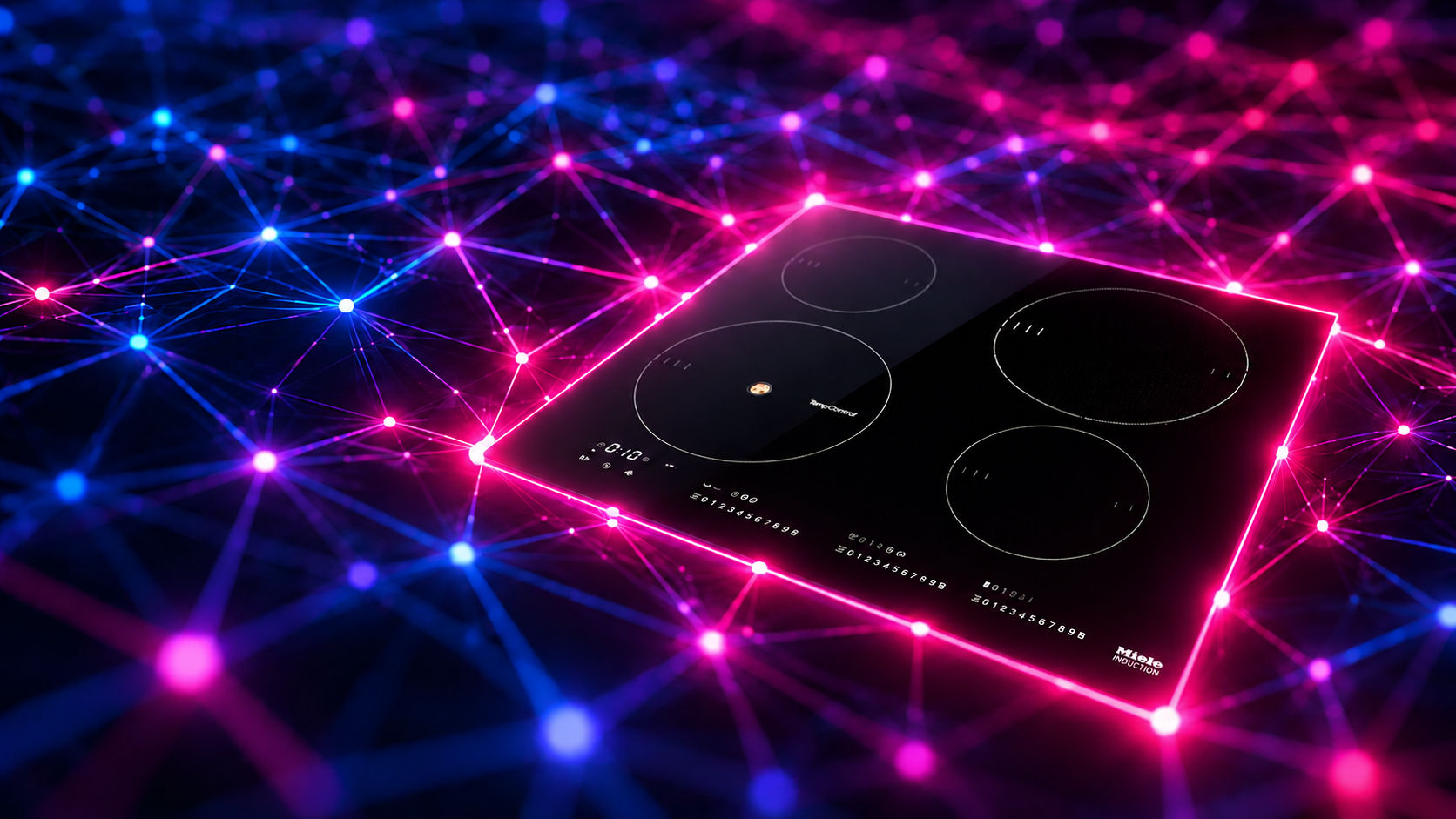
One potential solution is to purchase the Miele@home XGW3000 gateway; this would presumably handle at least the zigbee details for me. But hooking up this gateway to my Loxone system was still a huge unknown (lots of other proprietary RPC/JSON APIs to work with), and also its just really expensive. And not produced any more.
My other idea was to detect the current being drawn by the hob using a CT-clamp. That would work and may give us a reasonable estimate of how much power the hob was drawing, but the clamp still needs to be wired up for something to read the DC signal. It’s all do-able, but its not the neatest solution.
I also don’t have anywhere in the kitchen to wire in yet another device (neatly). But I do have a zigbee network already running on my Loxberry. I already knew that our hob supported the older gen-2 Miele@home / Con@ctivity protocol, as I’d tried previously to connect the hob to my Zigbee network. Zigbee2MQTT could see it was a router, but it had no idea what it was beyond that. The hob was just listed as an unknown device.
So the long-term goal was not just to understand this particular hob’s protocol, but to also add proper support for these older Miele appliances to Zigbee2MQTT.
This investigation turned into a bit of a reverse engineering odyssey. The major discovery was that the hob was doing more than trying to join; it was also looking for a very specific Miele@home peer that did not exist on my network.
Here’s what we’ll cover:
- Work out what the hob is actually doing on the Zigbee network.
- Decode the application data.
- Emulate enough of the Miele Con@ctivity protocol for the hob to talk to us.
1. Sniffing Zigbee networks
Zigbee2MQTT’s logs hinted that the hob had joined my network, but there was no information as to what was happening afterwards. To get any further I needed to see the Zigbee traffic itself.
I remembered I had an old Electrolama zig-a-zig-ah! USB stick lying around. I originally bought it because it sounded neat (it allows us to sniff Zigbee traffic after all). But it never got used, and I had to sift through my ‘home automation’ bucket of gadgets & gizmos to find it again. Turns out it really is neat!
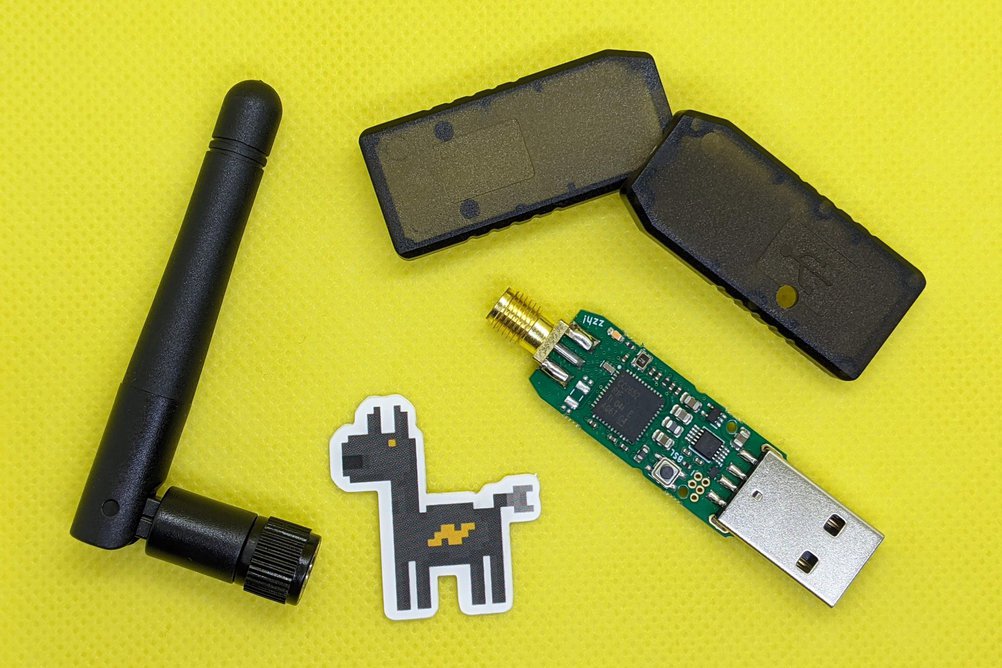
ZZH is based on the Texas Instruments CC2652R1 microcontroller. Rather than build a separate Zigbee test network, I flashed it with TI’s packet-sniffer firmware and used it to listen to the devices on my ‘prod’ home network.
Zig-a-Zig – Ah!
Out of the box, the ZZH dongle doesn’t do anything useful. So the first task was to replace its firmware with Texas Instruments’ sniffer_fw image for the CC26x2R1:
sniffer_fw/bin/cc26x2r1lp/sniffer_fw.hex
Flashing the image is simple enough using the cc2538-bsl tool. All we need to know is which USB port it’s plugged into:
cc2538-bsl -p /dev/ttyUSB0 -e -w -v ~/zzh-sniffer/sniffer_fw.hex
With the ZZH dongle updated, the next step is to get the set up ready for monitoring my Zigbee network. This is what we’re aiming at:
KM6839
   |
   | Zigbee channel 20
   |
ConBee II ---------------- Zigbee2MQTT
   |
   +---------------------- CC2652R1 sniffer
                               |
                               +-- SmartRF Packet Sniffer 2
                               +-- Wireshark
The ZZH with sniffer firmware is a passive RF device - it doesn’t act as a Zigbee client or router. All it’s doing is receiving channel 20 packets. Our challenge will be to route the packets its receiving into Wireshark and decrypt them so that we can see the real Zigbee protocol.
SmartRF Packet Sniffer 2
I’d hoped to do all this from Linux, but TI’s SmartRF Packet Sniffer only supports Windows. It’s simple enough to setup though:
In SmartRF Packet Sniffer 2, do this first:
- Install Wireshark (4.4.x)
- Install then start the SmartRF Packet Sniffer.
- Make sure the zzh/CC2652R1 sniffer is detected.
- Select IEEE 802.15.4, 2.4 GHz
- Select channel 20 (20 is the Zigbee channel I use; yours may be different)
- Go to Options → Data → Data Out.
- Select Use Pipe.
- Click Start All.
With the correct version of Wireshark installed, it’s trivial to start capturing ZigBee traffic:
& "C:\Program Files\Wireshark\Wireshark.exe" -i "\\.\pipe\tiwspc_data" -k
Decrypting the network
The Zigbee network key can be recovered from Zigbee2MQTT’s coordinator backup:
/opt/zigbee2mqtt/data/coordinator_backup.json
Once installed in Wireshark as a Zigbee network key, the production traffic decrypted correctly:
ZigBee Security Header
    Key: <network key>
    Key Label: Network Key
At this point I could finally see what the hob was doing after joining the network, and the first useful clue confirmed why Zigbee2MQTT didn’t get any further.
2. First clue: profile 0xC51E
The KM6839 successfully joined my network as a Zigbee router. Zigbee2MQTT reports the hob’s IEEE address - in my case it is 0xf8302d739346ffff
The first major clue came from watching the normal Zigbee interview. Zigbee2MQTT asks the hob for the Simple Descriptor of endpoint 0xD2 / 210:

Simple Descriptor Request for endpoint 210
Immediately we see the hob respond with something unexpected: a Simple Descriptor Response with profile 0xC51E, device ID 0x0052, and a mixture of standard Zigbee appliance clusters and a proprietary 0xFD02 cluster:
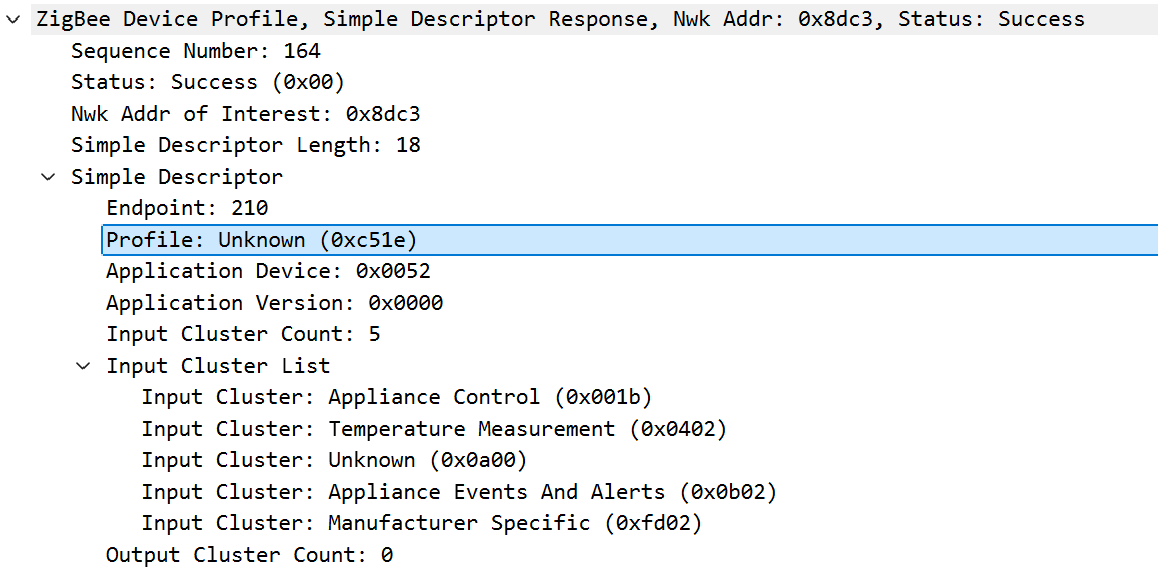
Simple Descriptor Response with profile 0xC51E
Normal home-automation devices usually advertise profile 0x0104, which is the standard Zigbee “Home Automation” profile. This is what Zigbee2MQTT already knows how to interpret.
But in our case, we see the completely unknown profile 0xC51E. This is a manufacturer-specific profile that Zigbee2MQTT does not know how to decode. 0xC51E must therefore be the application profile used by this generation of Miele@home equipment.
KM6839 endpoints
We see this process repeating across the hob’s other endpoints (212,213,214, etc). Capturing the same Simple Descriptor exchange for the hob’s other endpoints lets us build the complete endpoint map:
| Endpoint | Decimal | Input clusters | Output clusters |
|---|---|---|---|
0xD2 | 210 | 0x001B, 0x0402, 0x0A00, 0x0B02, 0xFD02 | — |
0xD4 | 212 | 0x000A | — |
0xD5 | 213 | 0xFD01 | 0xFD01 |
0xD6 | 214 | 0xFD00 | — |
0xD8 | 216 | 0x0003 | 0x0003, 0xFD05 |
Although this profile is unknown, we can learn more by also looking at the Input and Output clusters that the Miele hob advertises for each endpoint. Some of these are manufacturer-specific; of course, these will be the ones that we are interested in.
Miele seems to use both standard Zigbee clusters and proprietary 0xFDxx clusters. Known standard clusters include:
0x0003  Identify
0x000A  Time
0x001B  Appliance Control
0x0402  Temperature Measurement
0x0B02  Appliance Events & Alerts
alongside:
0xFD00  ??
0xFD01  ??
0xFD02  ??
0xFD05  ??
This last batch of 0xFDxx clusters are the really interesting ones, that tell us that this device provides functionality that we don’t know about (yet!).
3. Searching for a peer
Once the hob had joined and exposed its own endpoints, it then did something much more interesting: it broadcast a Match Descriptor Request, looking for a peer using the same Miele profile.
This was the breakthrough. This packet tells us that the hob was not simply joining the network and waiting for something to talk to it. It was broadcasting a Zigbee Device Profile request, asking whether any device on the network supported Miele profile 0xC51E, with a very specific set of clusters:
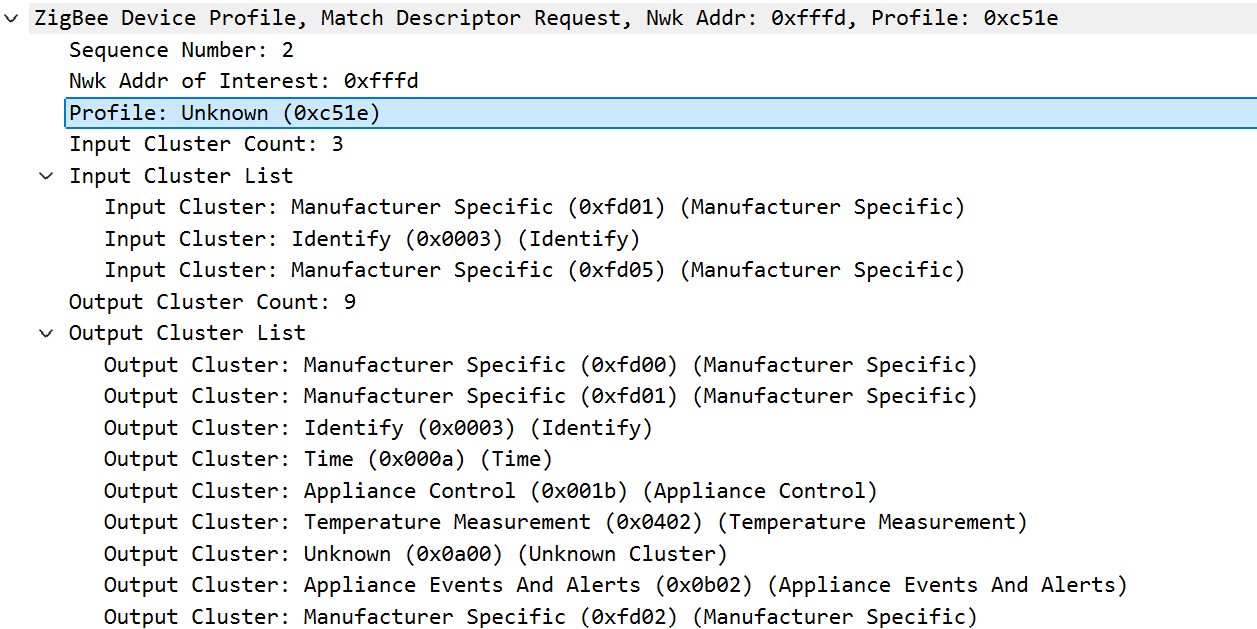
The hob broadcasts a ZDO Match Descriptor request for profile 0xC51E with a mixture of standard Zigbee clusters and Miele manufacturer-specific 0xFDxx clusters.
The wireshark capture contains some crucial information:
ZDO Match Descriptor Request
Cluster: 0x0006
Destination: 0xFFFD
Profile requested: 0xC51E
This packet completely changes the investigation. Zigbee2MQTT was not failing because the hob could not join the network. The hob had already joined successfully. The missing piece was a compatible Miele@home peer for it to talk to.
It asks the network for a device exposing a complementary set of clusters under the same 0xC51E profile. We see again the Miele-specific 0xFDxx clusters with no description. The requested clusters line up with the services exposed by the hob, and we have enough information to understand the intended architecture fairly well:
+------------------+               +--------------------+
| Miele KM6839     |               | Miele peer      |
| profile 0xC51E   | <-----------> | profile 0xC51E     |
+------------------+               +--------------------+
The hob isn’t simply joining a Zigbee network and reporting state like most home Zigbee devices do. It needs a compatible endpoint to talk to - presumably a compatble Miele extractor fan, or maybe a Miele gateway device - neither of which we know how to implement.
4. Emulating the Miele peer
The next step is to make our Zigbee coordinator advertise the service the hob is looking for. My network uses a ConBee II, through zigbee-herdsman’s deCONZ adapter.
The normal coordinator provided by deCONZ already has an endpoint for handling normal Zigbee Home Automation traffic:
endpoint 1
profile 0x0104
So I patched in another coordinator endpoint specifically for talking to the hob:
endpoint 2
profile 0xC51E
At this point I wasn’t trying to build a clean or upstreamable solution. I just wanted to prove that the missing Miele peer was really what prevented the hob from communicating. The quickest way to do that was to patch the coordinator endpoint table in zigbee-herdsman’s deCONZ adapter directly.
Miele coordinator endpoint
The endpoint map we saw at the start came from the hob itself during the normal Zigbee interview. We now need to build a map for the other side of that conversation: a coordinator endpoint definition that advertises the complementary Miele Con@civity profile that the hob is looking for.
In practice this lives in zigbee-herdsman’s deCONZ adapter code, where the ConBee coordinator endpoint table is built. I patched that table to add a second coordinator endpoint using profile 0xC51E, with the input and output clusters the hob had asked for in its Match Descriptor request.
The corresponding deCONZ endpoint definition was this:
this.fixParamEndpoint1 = Buffer.from([
    0x01,       // endpoint-table slot
    0x02,       // endpoint 2
    0x1e, 0xc5, // profile 0xC51E
    0x00, 0x00, // device ID
    0x01,       // device version

    0x03,       // input cluster count
    0x03, 0x00, // Identify
    0x05, 0xfd, // FD05
    0x01, 0xfd, // FD01

    0x09,       // output cluster count
    0x03, 0x00, // Identify
    0x00, 0xfd, // FD00
    0x01, 0xfd, // FD01
    0x0a, 0x00, // Time
    0x1b, 0x00, // Appliance Control
    0x02, 0x04, // Temperature
    0x00, 0x0a, // 0A00
    0x02, 0x0b, // Appliance Events & Alerts
    0x02, 0xfd, // FD02
]);
One important point to make: simply restarting Zigbee2MQTT was not enough to apply changes to the ConBee endpoint table. The ConBee had to be physically power-cycled.
After doing that the coordinator exposes:
endpoint 1
    profile 0x0104

endpoint 2
    profile 0xC51E
This was the missing configuration the hob had been searching for. There was still some deCONZ-specific pain in getting the Match Descriptor response to behave, but the important result was clear: once the hob believed there was a compatible Miele peer on endpoint 2, it started sending profile 0xC51E application traffic to the coordinator.
The hard-coded endpoint wasn’t going to be the final solution, but it had done its job: we’d proved what the hob was looking for and could finally move on to the Miele application protocol itself.
5. Completing the Miele sign-on
The hob was no longer just an unknown router sitting on the network. It had joined, advertised its Miele endpoints, found something that looked enough like a Miele peer, and started sending application traffic to coordinator endpoint 2.
But Zigbee2MQTT still did not know what the device was. Zigbee2MQTT support for devices is mostly driven by converter definitions. A converter is a small JavaScript module that tells Zigbee2MQTT how to recognise a device, which clusters it should listen to, and how incoming Zigbee messages should be turned into useful MQTT state.
For normal supported devices, these definitions live inside the zigbee-herdsman-converters package that Zigbee2MQTT already uses. For development and testing, Zigbee2MQTT also supports external converters - local converter files that are loaded at runtime without patching Zigbee2MQTT itself.
The next step was to add a local external converter for the KM6839. External converters live next to the Zigbee2MQTT configuration file. We’ll position ours like this:
zigbee2mqtt/
├── configuration.yaml
└── external_converters/
    └── miele-km6839.mjs
In newer Zigbee2MQTT versions, external JavaScript loading also has to be enabled:
advanced:
  enable_external_js: true
The first job for the converter is simply recognition. The hob does not identify itself with a friendly zigbeeModel string, so the converter fingerprint is based on the device descriptor that Zigbee2MQTT sees during the initial interview.
export default {
    fingerprint: [{
        type: 'Router',
        manufacturerID: 4393,

        endpoints: [
            {
                ID: 210,
                profileID: 0xc51e,
                deviceID: 0x0052,
                inputClusters: [27, 1026, 2560, 2818, 64770],
                outputClusters: [],
            },
            {
                ID: 212,
                profileID: 0xc51e,
                deviceID: 0x0052,
                inputClusters: [10],
                outputClusters: [],
            },
            {
                ID: 213,
                profileID: 0xc51e,
                deviceID: 0x0052,
                inputClusters: [64769],
                outputClusters: [64769],
            },
            {
                ID: 214,
                profileID: 0xc51e,
                deviceID: 0x0052,
                inputClusters: [64768],
                outputClusters: [],
            },
            {
                ID: 216,
                profileID: 0xc51e,
                deviceID: 0x0052,
                inputClusters: [3],
                outputClusters: [3, 64773],
            },
        ],
    }],

    model: 'KM6839',
    vendor: 'Miele',
    description: 'Miele KM6839 induction hob',
    fromZigbee: [],
    toZigbee: [],
    exposes: [],
};
We populate the endpoint descriptor list with the same information captured in the earlier Simple Descriptor and Match Descriptor flows. After adding this file and restarting Zigbee2MQTT, we see our hob change from an unsupported router into a recognised external device:
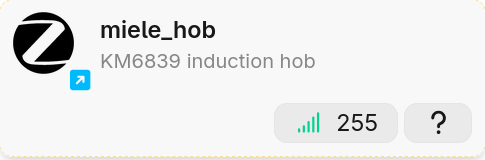
Recognised device. Yay!
supported = True
model     = KM6839
vendor    = Miele
source    = external
One useful detail when writing the converter is that unknown clusters arrive using decimal string identifiers:
64768 = 0xFD00
64769 = 0xFD01
64770 = 0xFD02
64773 = 0xFD05
So a converter rule for the 0xFD02 cluster needs to match:
{
    cluster: '64770',
    type: ['attributeReport'],
}
…rather than assuming 0xFD02 will appear as a numeric JavaScript value.
With that small external converter in place, the hob was finally visible to Zigbee2MQTT as a real Miele device. The next task was to watch the reports arriving from those proprietary clusters and work out what they meant.
6. First application traffic
Recognising the hob is only the first part of the converter’s job. At this point Zigbee2MQTT could identify the device as a Miele KM6839, but there are no message converters defined yet, so we can’t decode anything useful. Our initial converter has an empty fromZigbee list:
fromZigbee: [],
The next step is to add a few fromZigbee handlers that provide some debugging. These are not finished device support; they are just little protocol stubs whose job is to print incoming messages so I could see which clusters were active and what that data looks like.
A minimal handler for 0xFD02 looks something like this:
const mieleFd02 = {
    cluster: '64770', // 0xFD02
    type: ['attributeReport'],
    convert: (model, msg, publish, options, meta) => {
        meta.logger.info(`[MIELE] FD02 ep=${msg.endpoint.ID} data=${JSON.stringify(msg.data)}`);
        return {};
    },
};
With a few temporary handlers hooked up, the converter list looks something like this:
fromZigbee: [
    mieleIdentifyQuery,
    mieleApplianceControl,
    mieleFd01,
    mieleFd02,
],
After restarting Zigbee2MQTT, the converter was running and three interesting types of traffic appeared immediately in the logs.
7. Decoding the traffic
Identify Query
Endpoint 0xD8 repeatedly sends Zigbee Identify Query commands. We see this in the logs printed by our custom handler:
[MIELE] IdentifyQuery ep=216
The raw decoded message looks like:
cluster: genIdentify
type: commandIdentifyQuery
raw: 010001
The hob sent these approximately every ten seconds for several minutes. Identify is a standard Zigbee cluster, but here it appears to be part of the Miele sign-on process. The hob has found something that looks like a compatible peer, but it still seems to be asking “are you there?”. This suggests another part of the handshake is still incomplete.
Appliance Control
Endpoint 0xD2 (210) also started logging attributes through standard Zigbee Appliance Control cluster (0x001B):
[MIELE] ApplianceControl ep=210 data={"startTime":2}
[MIELE] ApplianceControl ep=210 data={"remainingTime":2}
The names are a little misleading. Zigbee-herdsman is decoding the attribute IDs using the standard Appliance Control schema, but the values did not look like times - they behave much more like appliance state codes.
That becomes clearer later when comparing them with the proprietary FD02 status block: the same transitions appear when the hob is off, on but idle, and actively cooking.
FD01
A proprietary 0xFD01 report was also observed:
cluster: 0xFD01
attribute: 0x0020
type: uint8
value: 1
I don’t know the purpose of this one yet. It may be part of the sign-on state, some small status field. For the moment it is enough to know that FD01 is active and that attribute 0x0020 seems to carry just one single-byte value.
The 0xFD02 status block
The most useful traffic came from the unknown/proprietary cluster 0xFD02. Zigbee-herdsman tells us the basic Zigbee layout of the message:
cluster:   0xFD02
attribute: 0x0020
data type: 0x41 / octet string
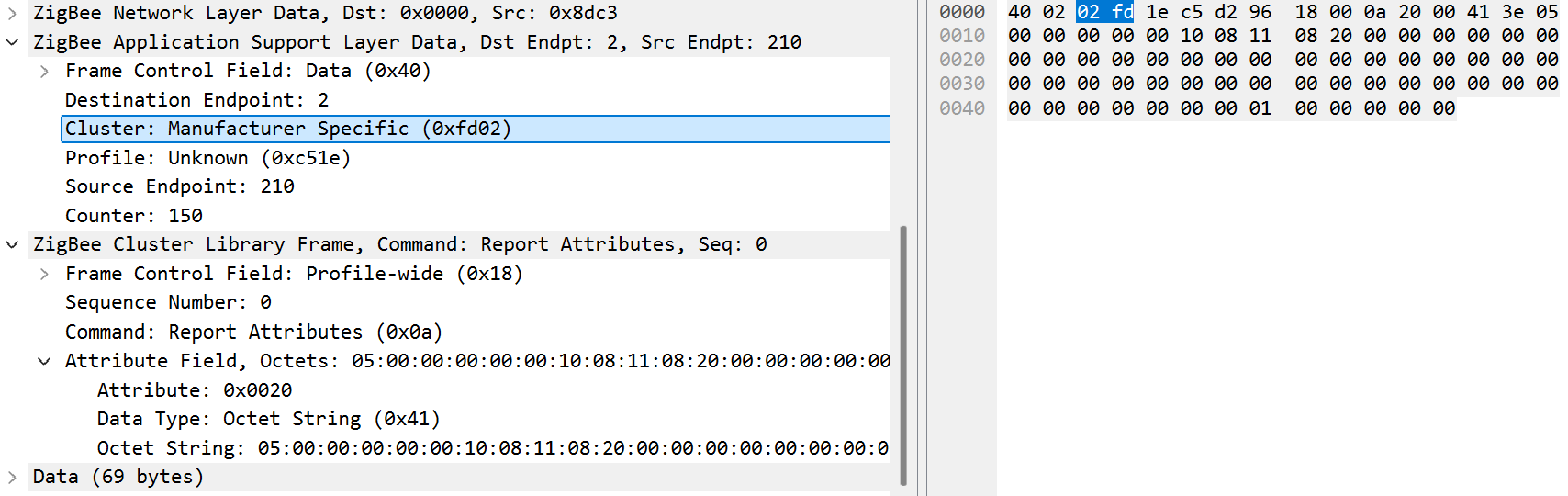
Wireshark decoding a Miele FD02 attribute report as an octet string.
That octet string data type is important. It means the value is just a block of raw bytes as far as Zigbee is concerned. There are no standard attribute names, units, or field definitions to rely on. If this was the hob’s real state report, we will have to reverse-engineer the meaning of the bytes by looking for changes while we manipulate the hob controls.
A typical report looks like this:
[MIELE] FD02 ep=210 bytes=
5,0,0,0,0,0,16,8,1,8,32,0,8,0,0,8,0,0,8,0,
0,0,0,0,0,0,0,0,0,0,0,0,0,0,0,0,0,0,0,0,
0,0,0,0,0,0,0,0,0,0,0,0,0,0,0,0,
1,0,0,0,0,0
This report is 62 bytes long. Changing controls on the hob while watching these byte sequences made it possible to start mapping out the structure.
Overall appliance state
Byte zero of 0xFD02 seems to track the overall appliance state. Observed values are:
FD02[0] | Observed state |
|---|---|
13 / 0x0D | hob off / standby |
2 / 0x02 | hob on, no cooking zone active |
5 / 0x05 | cooking zone active |
The Appliance Control attributes follow almost exactly the same state transitions:
| Hob state | Appliance Control | FD02[0] |
|---|---|---|
| Off / standby | startTime = 1, remainingTime = 1 | 13 / 0x0D |
| On / idle | startTime = 2, remainingTime = 2 | 2 / 0x02 |
| Cooking | startTime = 5, remainingTime = 5 | 5 / 0x05 |
| Off / standby | startTime = 1, remainingTime = 1 | 13 / 0x0D |
Four cooking-zone records
The first major structural pattern in FD02 is a group of four, three-byte records, with each group representing one zone on the hob:
byte  8..10   zone 0
byte 11..13   zone 1
byte 14..16   zone 2
byte 17..19   zone 3
The first byte of each record contains the cooking power of that zone. A test with several zones active at different cooking levels made this particularly obvious:
zone 0 (byte 8) = level 1
zone 1 (byte 11) = level 2
zone 2 (byte 14) = level 3
This produced:
... 1,8,32, 3,8,0, 5,8,0, 0,8,0 ...
    ^        ^      ^
   Z0       Z1     Z2
Cooking power/level encoding
The cooking-level encoding is simple once enough values are captured. The captured sequence included:
level 1 -> 0x01
level 2 -> 0x03
level 4 -> 0x07
level 6 -> 0x0B
level 7 -> 0x0D
level 9 -> 0x11
with the intervening values fitting the same pattern:
| Displayed level | Encoded value | Hex |
|---|---|---|
| Off | 0 | 0x00 |
| 1 | 1 | 0x01 |
| 2 | 3 | 0x03 |
| 3 | 5 | 0x05 |
| 4 | 7 | 0x07 |
| 5 | 9 | 0x09 |
| 6 | 11 | 0x0B |
| 7 | 13 | 0x0D |
| 8 | 15 | 0x0F |
| 9 | 17 | 0x11 |
We can deduce a relationship for levels 1–9 and the encoded value, with 0 representing off:
level = (encoded + 1) / 2
Remaining per-zone bytes
The power byte is the only part of each three-byte zone record that I can decode confidently so far:
+0  power
+1  unknown
+2  unknown
The second byte has usually been 0x08, and the third byte changes under some conditions. For example, this pattern was seen while no zone was actively cooking:
...,0,8,0, 0,8,0, 0,8,16, 0,8,16,...
Residual heat is one obvious possibility, but I have not proved that yet. There is also a second group of bytes later in the report that appears to follow the same four-zone ordering:
byte 56 -> zone 0
byte 57 -> zone 1
byte 58 -> zone 2
byte 59 -> zone 3
For now I am treating these as possible zone activity bytes. They confirm the zone ordering, but I have not seen enough variation to give them a stronger meaning.
8. From hack to upstream support
There are still a few loose ends in the Miele protocol itself. The KM6839 can combine two physical cooking zones into one larger PowerFlex area, which I haven’t mapped yet. There are also several fields in FD02, and the other proprietary FDxx clusters, whose purpose remains unknown.
But none of that prevents the hob from doing what I originally wanted: reporting its state and cooking-zone power levels into Zigbee2MQTT. The most important next step was to take my hacked local install of Zigbee2MQTT and turn this into a proper upstream supported device .
The hard-coded deCONZ endpoint from earlier had proved that the hob would communicate once its Match Descriptor request found a coordinator endpoint advertising profile 0xC51E. It worked, but baking a Miele-specific endpoint directly into the deCONZ adapter clearly isn’t the final solution.
The cleaner approach is to separate the two parts of the integration.
zigbee-herdsman-converters contains the actual KM6839 device support: recognising the hob, decoding the Miele messages and exposing useful state to Zigbee2MQTT.
The coordinator-side support belongs lower down in zigbee-herdsman. Rather than hard-coding Miele behaviour into an adapter, herdsman can provide an opt-in mechanism for additional coordinator service endpoints. Zigbee2MQTT can request the mieleGateway service when required, and the adapter can expose the corresponding 0xC51E endpoint.
For now I’ve implemented that coordinator mechanism for deCONZ, since that’s the adapter and ConBee II hardware I’ve actually tested. The same mechanism can be implemented by other adapters later without making the API itself deCONZ- or Miele-specific.
That leaves the original endpoint-table patch where it belongs: as an experiment that proved the protocol, rather than the final implementation.
9. Current protocol map
At this point the known portion of the protocol looks like this:
| Profile / cluster | Meaning | Status |
|---|---|---|
0xC51E | Miele@home application profile | confirmed |
0x0003 | Identify / peer discovery | confirmed |
0x001B | Appliance Control / state | partially decoded |
0x0402 | Temperature | standard cluster, not yet investigated |
0x0A00 | unknown/application | not decoded |
0x0B02 | Appliance Events & Alerts | not decoded |
0xFD00 | proprietary | not decoded |
0xFD01 | proprietary, attr 0x0020 observed | not decoded |
0xFD02 | main hob status block | partially decoded |
0xFD05 | proprietary | not decoded |
Known FD02 layout
offset    meaning

  0       overall hob state

  8       zone 0 power
  9       zone 0 unknown
 10       zone 0 unknown

 11       zone 1 power
 12       zone 1 unknown
 13       zone 1 unknown

 14       zone 2 power
 15       zone 2 unknown
 16       zone 2 unknown

 17       zone 3 power
 18       zone 3 unknown
 19       zone 3 unknown

 56       zone 0 possible zone activity
 57       zone 1 possible zone activity
 58       zone 2 possible zone activity
 59       zone 3 possible zone activity
Known overall states
FD02[0]

0x0D / 13  off / standby
0x02 / 2   powered on / idle
0x05 / 5   cooking
Known power encoding
0x00  off
0x01  level 1
0x03  level 2
0x05  level 3
0x07  level 4
0x09  level 5
0x0B  level 6
0x0D  level 7
0x0F  level 8
0x11  level 9
10. Recap
We’ve gone a long way. What started as a totally unknown, unsupported Zigbee device has turned into a recognisable Miele hob that Zigbee2MQTT can understand, with no additional Miele gateway hardware.
We can read hob state & power levels, but do not yet have full device support. I’d still call that a result!
The KM6839 uses its own Miele@home application profile, 0xC51E. After joining a Zigbee network it actively searches for a compatible Miele peer using a ZDO Match Descriptor request. Without that peer, the interesting part of the protocol never really gets started.
Emulating that endpoint was the breakthrough. Once the hob found what it thought was a compatible Miele device, it began sending its application state, including the FD02 status block that contains the state of the hob and its individual cooking zones.
We now know enough to turn that reverse engineering into useful Zigbee2MQTT support:
Miele profile             0xC51E
Miele device ID           0x0052

peer discovery            ZDO Match Descriptor
peer endpoint             endpoint 2 / profile 0xC51E

four cooking zones        mapped
power levels              decoded
overall appliance state   decoded

FD01 / FD02 / FD00 / FD05 identified (not decoded)
FD02                      partially decoded

KM6839 recognised by Zigbee2MQTT external converter
There is still some decoding work to complete, but honestly it’s very low-priority now that I’ve solved the immediate goal of being able to read the hob’s power-levels. I can now move on to linking it up to my Westin extractor fan (controlled by RF433), but that’s a topic for another day.
Now we’re just waiting for Zigbee2MQTT to incorporate this work:
feat(add): Miele KM6839 - #13235